AI Blueprint for Small Businesses 📃
I speak to many SMB founders and most are lost on AI application
That is the entire artifact. If yours runs longer than 12 to 15 tasks, you have drifted into vendor-deck territory and you will not ship anything. The whole point is that it stays small enough that you can act on it on Monday morning.
Where you are on the curve
|
|
Figure 1
The four stages of AI maturity in an SMB
Based on patterns observed across roughly 40 SMB consulting engagements between 2024 and 2026. Most teams cluster at “Trying” because the move from Trying to Working requires saying no to new tools, which is harder than buying them.
|
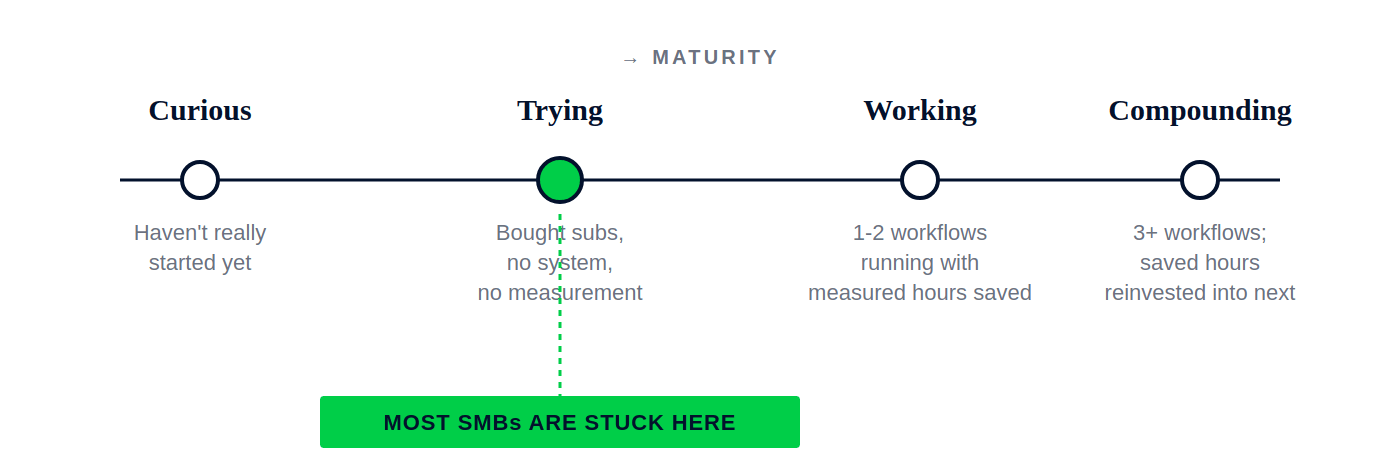
The rest of this letter is mostly written for the move from Trying to Working, which means one or two real workflows running with measured hours saved. If you're at Curious and the seven steps below feel like a lot, hold on; there's a smaller starter move I'll come back to before we close out.
The 7-step blueprint
STEP 01Audit tasks, not tools
For one week, every person on your team logs every recurring task they touch in a spreadsheet with three columns: what the task is, how often it happens per week, and how long it takes each time. That is everything you do in week one.
I ran exactly this exercise last year with a small jewellery brand we work with. Seven people on the team. They came back with 134 unique recurring tasks across the company. About two-thirds of those tasks happened more than five times a week. Almost half were under fifteen minutes each.
That is where the conversation gets useful. Until you have that list, you don't have a scope, you have a feeling. Most founders skip this step because writing tasks down in a spreadsheet feels too unglamorous to be the unlock, but it genuinely is. Without the list, every conversation about AI in your business stays a shopping conversation. With the list, you're choosing between named options on a page.
|
Figure 2
A small slice of the audit (jewellery brand, 7-person team)
A real, lightly anonymised sample. The right-hand column comes from the three-question filter in Step 02. Notice that the “Hours/week” column on its own already tells you which tasks deserve your attention first: high-frequency, low-judgment work at the top.
|
STEP 02The three-question filter
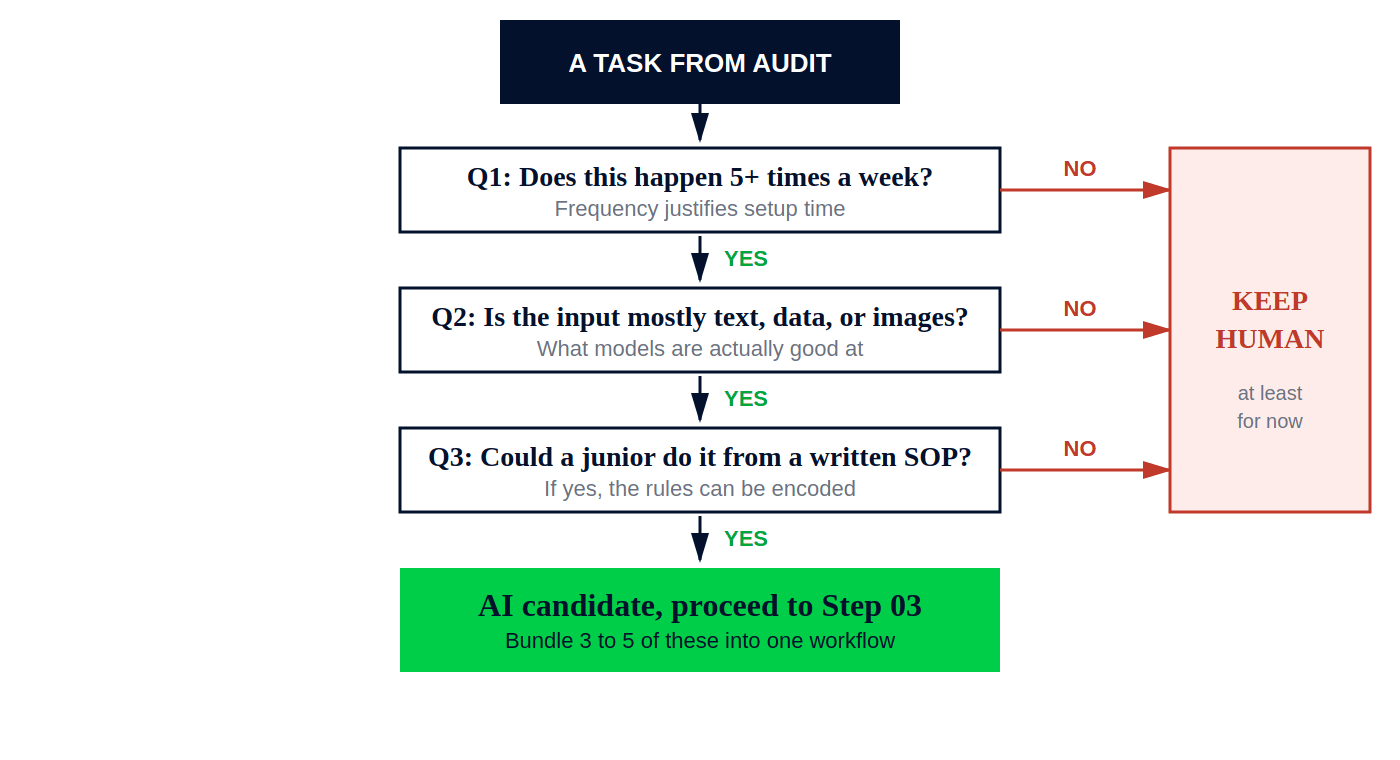
Once you have the list, you run each task through three questions:
|
|||
|
|||
|
Three yeses, you have a real candidate. Even one no, leave it for now. This filter on its own kills 80% of the “AI use cases” any vendor will pitch you.
Let me show you how it actually plays out using three real tasks from the jewellery brand's list.
“Replying to repeat customer questions about ring sizing” happens around 25 times a week, the input is text email, and a junior person on the CX team can absolutely do it from a sizing-chart SOP. Three yeses. Strong AI candidate.
“Choosing which photoshoot concept to greenlight for the next collection” happens once a week, the input is creative judgment about brand fit, and no SOP exists or could exist. Two clear no's. Stays human, probably forever.
“Writing product descriptions for new SKUs” happens around 12 times a week, the input is product specs and brand voice, and a junior could do it from a brand-voice SOP. Yes on all three, but with a caveat: this is an AI candidate
only with mandatory human editing. That distinction matters and we'll come back to it in Step 05.
|
Figure 3
The three-question filter, as a decision flow
Three yeses to qualify. Any single “no” sends the task to “Keep Human, at least for now.” Re-run the filter every six months: what is a “no” today often becomes a “yes” as your SOPs mature.
|
STEP 03Pick one workflow, not ten tools
A workflow is three to five connected tasks that share inputs or outputs, not one isolated task. Picking one workflow is harder than it sounds because the temptation is always to pick everything in your audit.
Workflows I've watched actually deliver for SMBs in the first 60 days:
|
|||
|
|||
|
|||
|
|||
|
Pick one of these, not five. I will fight any founder who tries to start with two. The team that finishes one workflow always beats the team that starts five and finishes none, and I've watched this play out across enough engagements that it is no longer a debate for me.
STEP 04Use what you already pay for
Before you buy anything new, ask yourself one question:
have we used 30% of what we already pay for? The honest answer in almost every SMB I walk into is no.
A short list of capacity that is almost always sitting unused inside SMB stacks I audit:
|
|||
|
|||
|
|||
|
|||
|
If you are spending more than $200 a month (around ₹17,000) on AI subscriptions in your first six months, you are not solving a problem, you are collecting tools. The new subscription is rarely the unlock. The unused capacity in the old one usually is.
STEP 05Human-in-the-loop, not human-out-of-the-loop
For at least the first 90 days, AI drafts and a human approves before anything leaves your business. There are no exceptions to that, even on internal emails or routine lead routing.
Two real cases from the last twelve months that I keep coming back to with founders:
A small e-commerce brand in the wellness category let an AI tool generate product descriptions and ship them straight to the site without review. Three SKUs went live with claims about pain relief that violated their advertising terms with Meta. The account was flagged within a week, and roughly two months of ad spend and creative work was disrupted while they cleaned it up.
A six-person agency built an auto-reply flow for inbound client emails using a popular agentic platform. The model committed to a project delivery date the team couldn't actually hit. The client found out from the AI before the team did, and the relationship needed serious repair after that.
Both teams were under ten people. Both situations happened because someone read a thread on X about “agentic workflows” and assumed day-one full automation was the move. It almost never is, and the cost of getting it wrong is far bigger than the time you save.
The unsexy version wins here: AI drafts, a human approves, and you run that loop for 90 days. Only when you have actual data on what your AI gets wrong do you start removing humans from specific steps, and even then, never all of them at once.
STEP 06Measure in hours, not features
There is exactly one metric I track when an SMB starts doing this seriously: hours saved per week per workflow. Not adoption rates. Not percentage of team using AI tools. Hours saved.
Why? Because hours saved is the only number that maps directly to payroll and team capacity. Everything else is something a vendor invented in order to sell you a dashboard.
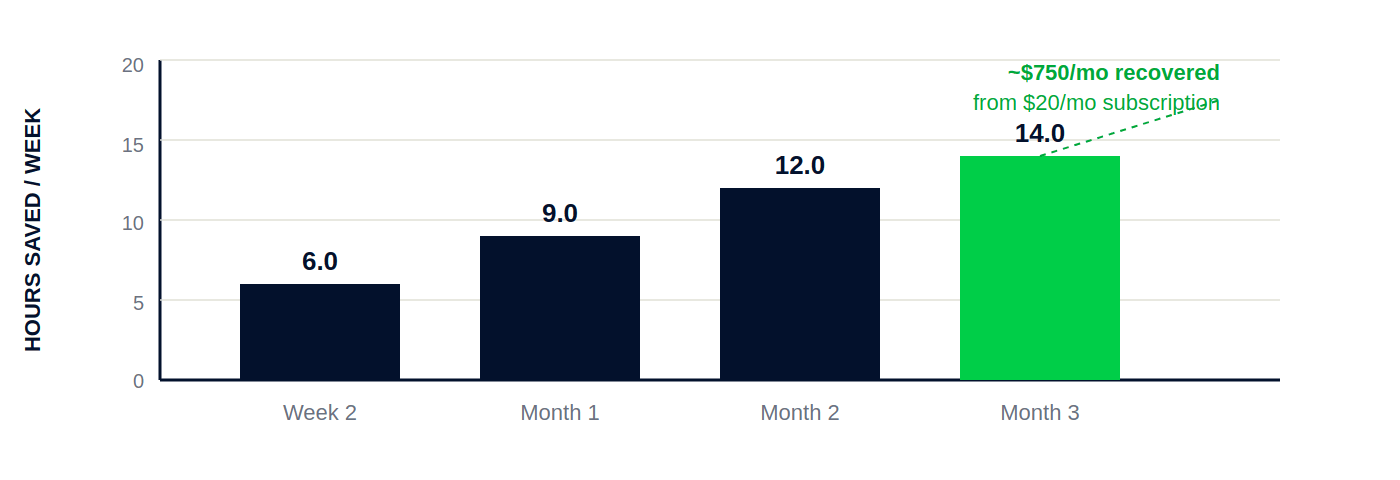
Here is the math on a real example. Last year, a generic pharmacy chain we worked with started using a Claude Project in their customer support function to draft tier-one replies for order status, refund timelines, and generic FAQs. By week 2, the workflow was saving roughly 6 hours a week across two CX agents. By month 3, we'd added invoice query handling to the same project and it was saving close to 14 hours a week. Roughly $700 to $800 a month (around ₹60,000 to 70,000) of recovered capacity from a $20-a-month Claude subscription. Those are the kind of numbers your tracker should be producing.
|
Figure 4
CX workflow at the pharmacy chain: hours saved per week, weeks 2 through 12
A single workflow saving 14 hours a week is roughly equivalent to recovering 35 to 40% of one full-time CX agent's capacity. The compounding shape of this curve isn't from the AI getting better, it is from the team getting better at using the same tool. That distinction matters.
|
The decision rule on this metric: if a workflow is saving under 2 hours a week after the second week, kill it. If it is saving more than 5, scale it. If it is saving negative hours, which happens more than people admit when the human edit time exceeds the original task time, definitely kill it.
Stop tracking abstract metrics like “AI adoption” or “AI maturity.” Those metrics belong on a vendor's dashboard, not yours. Hours saved is the one that travels.
STEP 07Compound, don't consume
This is the step most SMBs miss completely, and missing it is what separates the “Working” stage from the “Compounding” stage on Figure 1. The hours you save have to go somewhere intentional. If they disappear into more meetings, or get backfilled with more output of the same kind, AI hasn't actually changed anything for you.
The compounding move is simple to describe and difficult to execute: take the hours saved and reinvest them into building the next workflow. By month 6, you're not running one workflow saving 5 hours, you're running four workflows saving 20. By month 12, you've changed how the business operates without having to change what the business does.
If your saved hours quietly turn into longer Slack threads and more standups, you are back where you started, just with a bigger SaaS bill.
What this realistically costs
For a 5 to 10 person SMB, you should not be spending more than $150 to $200 a month (around ₹13,000 to 17,000) on AI subscriptions in the first six months. About half of that is what you already pay for ChatGPT Plus and Claude Pro. The other half covers a Zapier or Make automation account when you're ready to wire workflows together, usually somewhere around month four.
If you're spending more than that and you don't yet have a single workflow saving real hours, you don't have a tooling problem. You have a focus problem, which is what Step 01 was supposed to fix.
|
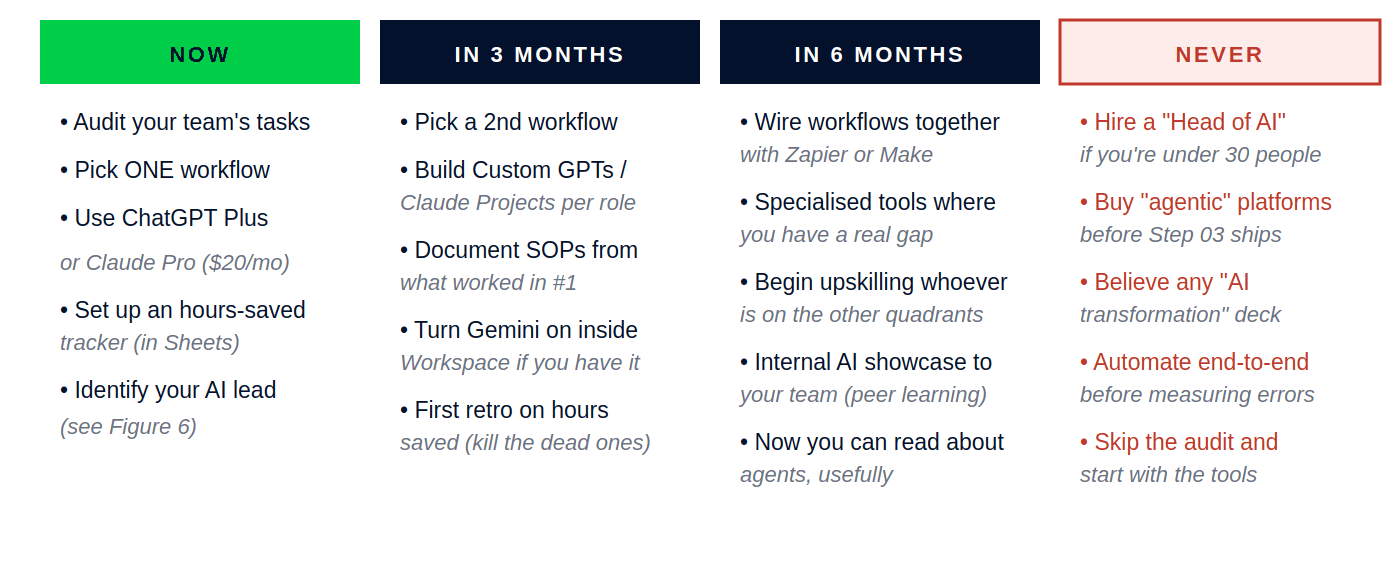
Figure 5
What to do now, in 3 months, in 6 months, and what to ignore forever
The “Never” column is the one most SMB founders need most. Every item there is a real pitch I have watched land in a founder's inbox in the last six months. Anything labelled “transformation” or “agentic” at $100+ a seat belongs in that column until you have cleared the first three.
|
If you haven't really started yet
Some of you reading this are at “Curious” on Figure 1, and the seven steps look like a lot. Fair enough. Here is the smaller move that gets you to “Trying” without a deck.
For the next 30 days, you do exactly two things, and nothing else.
First: pick one of ChatGPT Plus or Claude Pro. Just one. $20 a month, around ₹1,800. Use it for an hour a day, every working day, for thirty days. Use it for whatever real work crosses your desk. Drafting an email to a vendor. Summarising a 40-page PDF. Sense-checking a proposal. Pulling an outline together for a meeting. Rewriting a job description. Don't read about it on Twitter. Use it.
Second: at the end of those 30 days, write down the three tasks where it actually saved you time. Those three tasks are your starter list. That is where Step 01 of the blueprint actually begins for you.
You don't need a strategy at this stage. You need 30 hours of hands-on use. Almost every founder I have watched leapfrog on AI did exactly this and nothing else for the first month. They didn't announce a rollout, they didn't hire a consultant, they just used the tool until they had real data on what it could do for them.
The talent question nobody puts in the playbook
Once you decide to do this seriously, the next question becomes: who in your team becomes the AI lead? This is the part most playbooks skip because the honest answer is uncomfortable for everyone.
Two patterns I have watched repeat across consulting engagements:
The AI lead in a small team is rarely the most senior person, and almost never the person whose job title has “tech” in it. They are usually the curious operator who has already been using these tools at home, on weekends, for fun. By the time you ask them to lead something, they have already started. You are simply naming what they were doing anyway.
Domain expertise beats AI fluency, every single time. A customer support manager who learns Claude well will out-deliver a developer hired six months ago. The depth of workflow knowledge matters more than the depth of prompt knowledge, and you can teach prompting much faster than you can teach a function. This is why you don't hire your AI lead from the outside. You grow them from inside.
|
Figure 6
Talent matrix: who in your team should lead AI?
Plot every person on your team on this grid. The top-right quadrant is rarely empty in companies over five people. It is usually one or two specific names that come to mind. Those are the people you upskill, not replace.
|
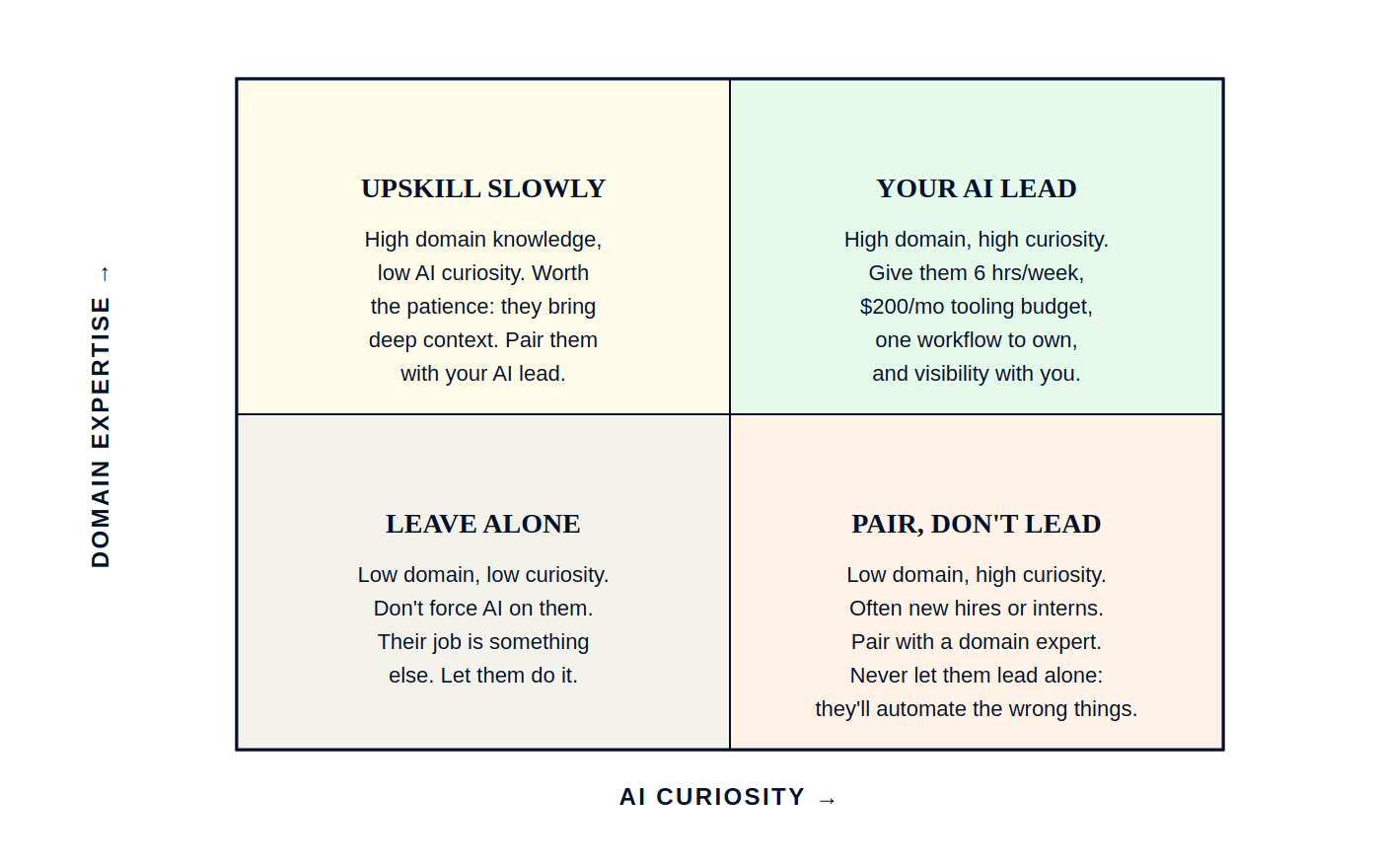
Upskill or hire? The decision rule
The cleanest decision rule I have found:
if anyone on your team is in the top-right quadrant of Figure 6, you upskill, every single time. Give them six hours a week of protected time, a $200-a-month tooling budget, one workflow to own, and direct visibility with you. They will out-deliver any external hire you could make for under $100K a year.
If your top-right quadrant is genuinely empty, then yes, you hire. But you do not hire a “Head of AI.” You hire for AI fluency layered on top of an existing functional role: a marketing person who is deep on Claude, an operations person who has already shipped automations in n8n or Zapier, a CX lead who has run an AI-powered support setup before. The role title is the existing function with “AI” as a modifier, not a new function.
The “Head of AI” hire with no functional domain is the most expensive mistake I am watching SMBs make in 2026. They cost $80K to $150K a year (around ₹70L to 1.3Cr), they spend their first three months building a strategy deck, they ship slide presentations instead of workflows, and by month six everyone wonders what has actually changed. A single curious operator on your existing team, given the same time and a smaller budget, beats this hire about 9 times out of 10 in companies under 30 people. I am not theorising. I have watched this play out across enough engagements that I now treat it as a default.
If you're an employee reading this, read carefully
I know a meaningful number of you are not founders. You work at SMBs, and you have stayed with this letter for fifteen minutes. The next bit is for you specifically.
The AI lead role at your company is open right now. Almost no one inside your team is positioning themselves for it. Most of your colleagues are still treating AI as a Twitter trend they will get to “when things calm down.” This is one of the most asymmetric career bets you can make over the next 24 months, and it costs you almost nothing to take.
What to actually do, in this order:
One. Become the most fluent person on your team on the AI tools your company already pays for. Two focused weekends gets you ahead of 95% of your colleagues, because most of them won't bother. Read the docs for ChatGPT Projects. Build a Claude Project for your role. Try Custom GPTs. Use Gemini in your Workspace if your company has it.
Two. Find one repetitive workflow in your own role that is painful and that you do every week. Build the AI version of it on your own time. Don't ask for permission first. Show your manager the working version, alongside the time it actually saves you compared to the old way.
Three. When your manager says “this is interesting,” and they almost always do, offer to roll it out across the team. Now you are leading the company's AI initiative without anyone formally giving you the role. The role finds you because you raised your hand first.
Four. Document the hours saved. Bring that number to your appraisal conversation, your promotion conversation, your salary conversation. Hours saved is the number that travels across companies. It is a portable career asset, not just an internal one.
This works because most founders genuinely don't know who in their team should lead this. They are looking for the person who raises their hand. Be that person.
The mental model when you are talking to your manager is not
“I am worried AI will replace me.” It is
“I want to be the person who leads our AI build.” Those two sentences map to two completely different career trajectories over the next 18 months. Pick the second one.
The blueprint stays small on purpose. Anything bigger is somebody else's plan, and they want you to pay for it.
If I had to compress everything in this letter into one paragraph: pick one workflow and finish it before you start the second; use the AI tools you already pay for before you buy more; audit your team's tasks before you automate any of them; measure in hours saved rather than features used; and reinvest those saved hours into building the next workflow rather than letting them disappear into your calendar. That is the entire blueprint.
Six months from now, the SMBs that did exactly this will look unrecognisable next to the ones that bought five subscriptions and forwarded threads to their team. I have watched this gap open up across every cohort I have worked with for the last 18 months. There is no reason it shouldn't be your team on the right side of it.
|
Until next issue,
Apurv
|
|

Ground Truth
By Apurv Singh, Growth Architect. For people building AI-first growth systems.